Budget Labor Configuration
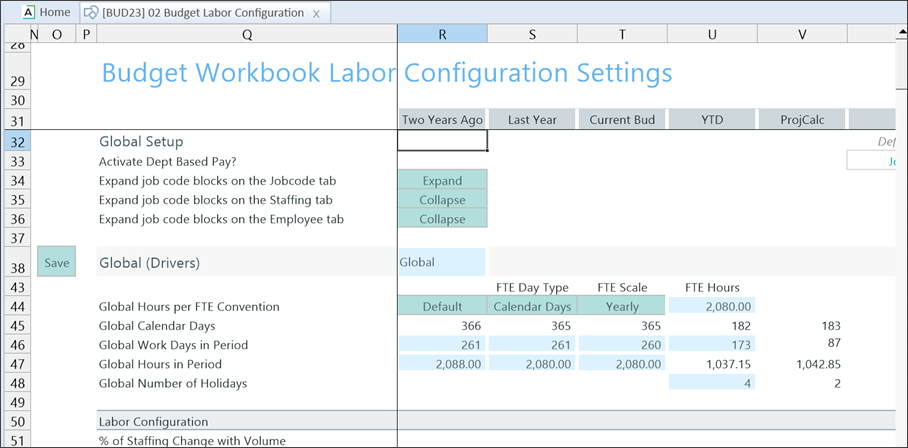
The 02 Budget Labor Configuration (Budget Workbook Labor Configuration Settings) driver includes default settings that track and calculate labor-related expenses. You can set exceptions for specific budget groups by adding another calculation method and entering data for that group.
This driver uses the FTE Scale field in the Year Period table of the Global Setup section. However, you can modify the defaults at the Budget Group level. For more information, see Setting year and period.
NOTE: Budgeting Analyst and Budgeting Admin users, or users with access to the 02 Budget Labor Configuration driver and the Global Driver Management role, can edit the FTE scale in this driver.
Settings
To access the driver:
- Go to Admin > Admin Task Panes > Budget Admin > Budget Assumptions and double click the desired driver set:
- Access NY Budget Assumptions (next year's budget drivers)
- Access CY Budget Assumptions (current year's budget drivers)
Choose the refresh variables.
NOTE: Refresh variable selection depends on the driver's requirements. Some variables may not display, and not all drivers include refresh variable options.
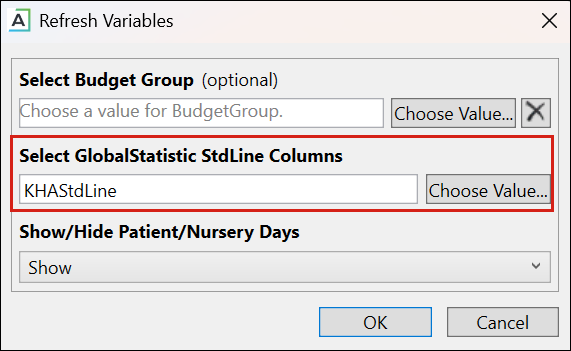
TIP: When refresh variables require a standard line, you must select at least one. If none are selected, the OK button is disabled.
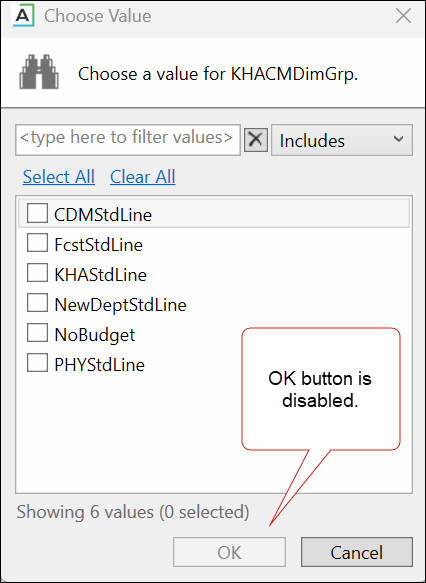
KHAStdLine is the default for the following drivers: 7-10 Budget Global Data, 05 Global Depreciation, 11 Global Expense Budget, and 12 Budget Revenue Global Revenue.
Department selection appears for the following drivers: 03 Budget Statistics, 05 Budget Depreciation, 11 Global Expense Budget, 12 Global Revenue Budget, 14 Budget Labor Rates, 20 Budget Global Sum, 23 Budget Global Labor Premium Dollars, 24 Budget Labor Benchmark, 28 Budget Labor Target, 36 Budget Provider Simple Dept Config, 42 Bugdet Stat Account.
-
To save any changes, right click the driver tab and select Save > Save Data Only.
You must configure the global settings before you configure the budget group blocks.
Configure Global Setup and Global (Drivers)
Global configuration includes the following sections. Configure the settings for each section.
- Global Setup
- Global (Drivers)
This table describes the global settings row categories.
| Option | Definition |
|---|---|
| Activate Dept Based Pay? |
Enables or disables department-based pay and designates a default JobCode. (Default is JDept). IMPORTANT: If Activate Dept Based Pay is set to No in the 02 Labor Config driver, the Dept Other Pay section is hidden in the plan file (Jobcode, Employee, and Staffing tabs). However, previously saved department-level pay rows (JDept data) remain visible and are not automatically deleted. To fully remove Dept Other Pay data, delete the related rows in the plan file before processing. |
| Expand job code blocks on the Jobcode tab |
Select Collapse or Expand to hide or display the job code details on the Jobcode, Staffing, or Employee tabs. This global setting determines the default view on each tab when a plan file is opened. IMPORTANT: This setup affects archiving plan files. To include the job code details in the archived plan file, expand these sections. |
| Expand job code blocks on the Staffing tab | |
| Expand job code blocks on the Employee tab | |
| Global or BudgetGroup name Hours per FTE Convention |
Either:
For more information, see Setting year and period. |
| Global or BudgetGroup name Calendar Days | The calendar days for the YTD, remainder of the current year, and upcoming budget years. |
| Global or BudgetGroup name Work Days in Period | The work days in each period. |
| Global or BudgetGroup name Hours in Period | The hours in each period, calculated by work days. |
| Global or BudgetGroup name Number of Holidays | The number of holidays in each period. |
Budget Labor configuration includes the following tasks:
